Insurance & compliance (if enabled — enterprise plan)
Manage the data that makes health fund claims and insurance audits pass: insurance companies, provider numbers, treatment records and their correction trail.
How insurance data is structured
Platform (global)          Store level
┌──────────────────┐      ┌─────────────────────────┐
│ Insurance Company │◄────►│ Insurance Group (per store)│
│ (e.g. Medibank)  │      │ Groups companies together │
└──────────────────┘      └─────────────────────────┘
                                     │
                          ┌──────────┴───────────────────┐
                          │ Provider Number              │
                          │ (provider × insurance group) │
                          └──────────────────────────────┘
- Insurance companies are global (managed by platform admin). All stores see the same list.
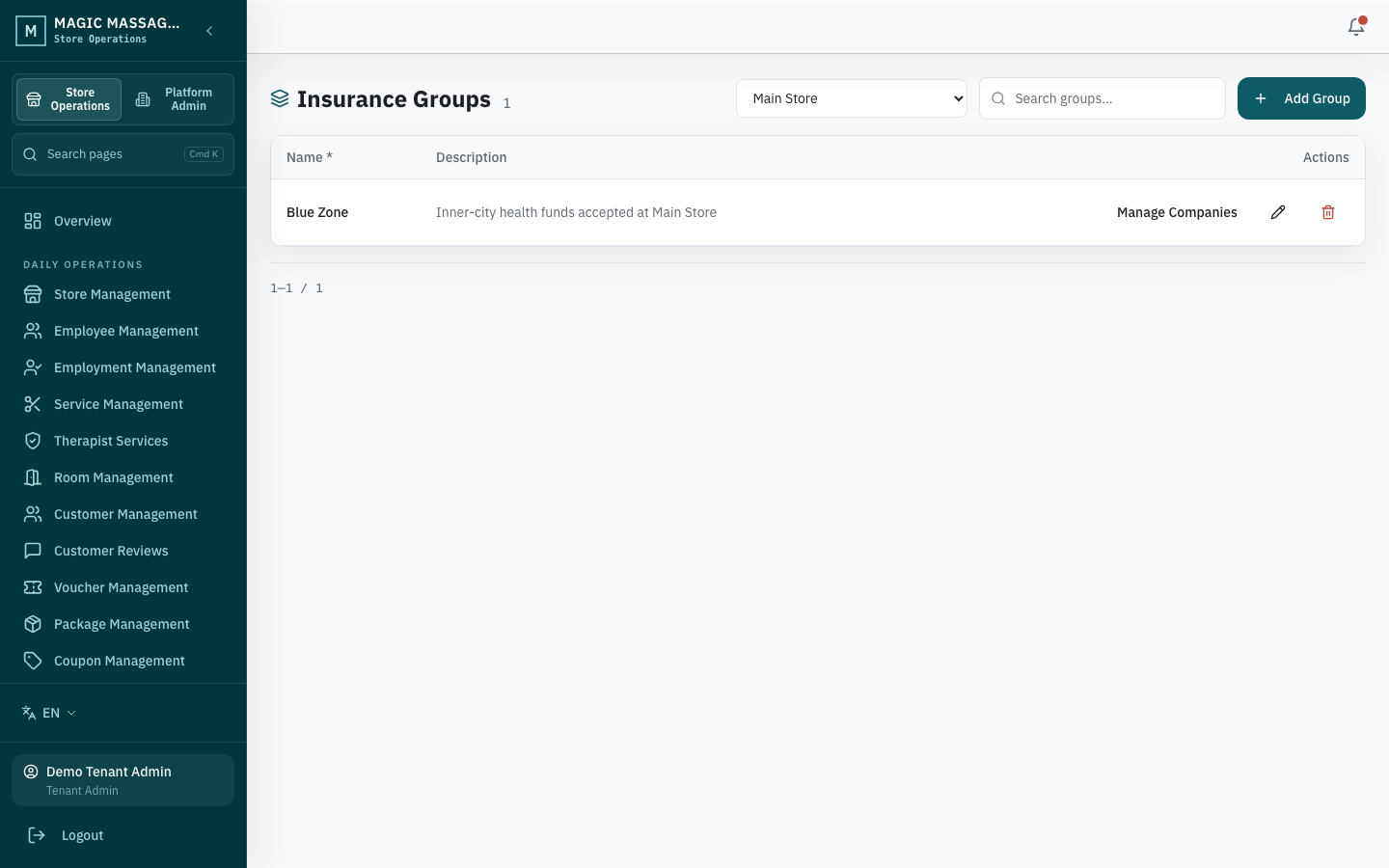
- Insurance groups are per-store: your store groups companies into meaningful clusters (e.g. "Private health funds", "Workers comp").
- Provider numbers link a provider to an insurance group (the store-level cluster of companies) plus the registered number.
Insurance companies
Admin → Insurance Companies (read-only for non-super-admin)
The master list of all Australian health funds and insurers. If an insurer isn't listed, POS staff pick Other and type the name during a HICAPS payment or tax invoice. The first pending request with that Store and name lands in a platform review queue (Admin → Insurance Requests, super admin only) where a super admin either adds it to the standard library or rejects it — there is no request form in Admin. Approval does not rewrite the insurer name frozen on an existing payment or invoice.
Insurance groups
Admin → Insurance Groups
Each store organises companies into groups. A company can only belong to one group per store.
Managing group membership
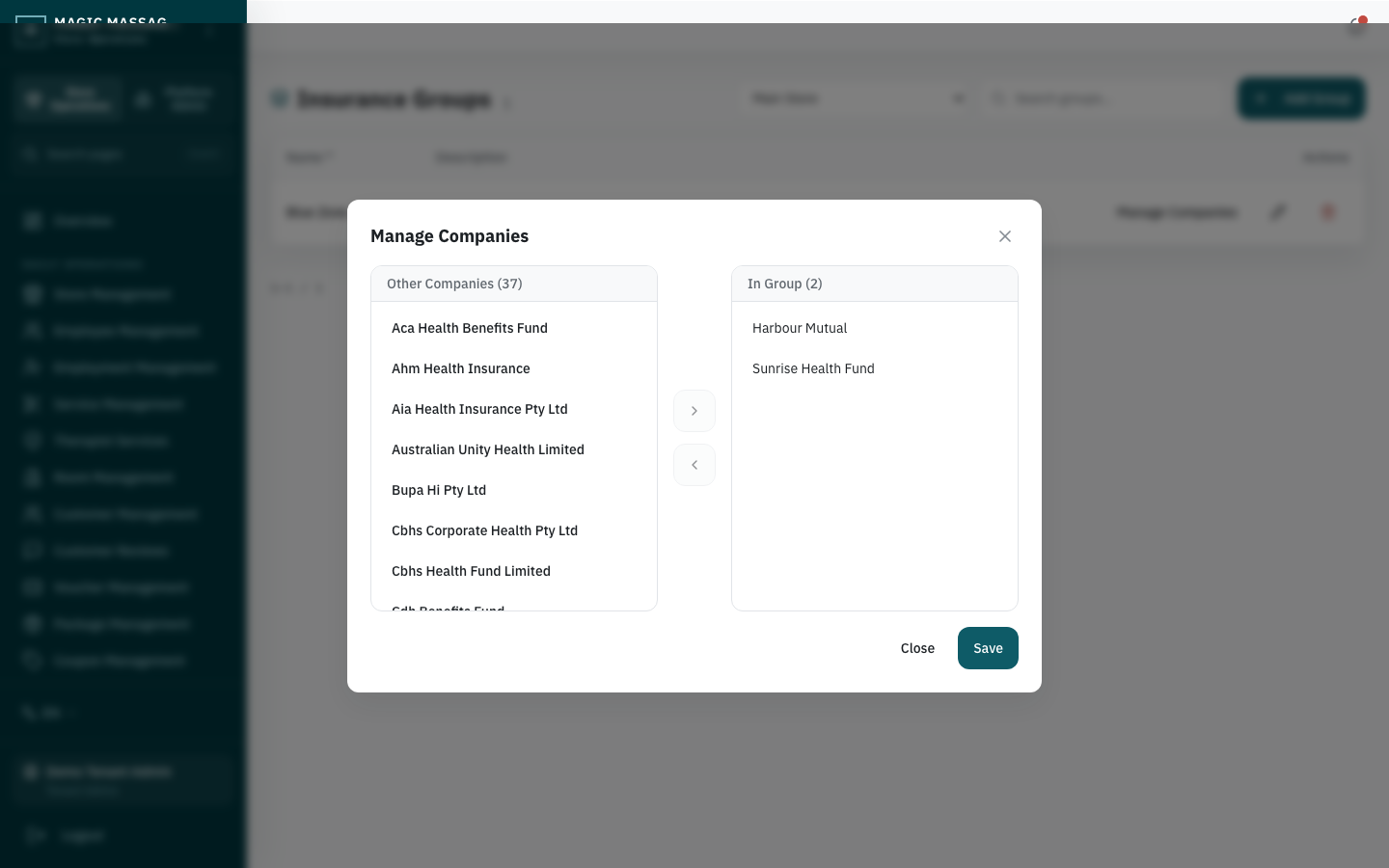
- Select a group → Manage companies (shuttle box).
- Left panel: available companies (not yet in any group at this store).
- Right panel: companies in this group.
- Move companies between panels → Save.
Providers & Provider Numbers
Admin → Providers and Admin → Provider Numbers
A Provider is the identity of a registered health practitioner (usually your therapist). A Provider Number links that provider to an insurance group at that store, plus the registered number.
Registering a provider number
- Create the practitioner on Admin → Providers → Add Provider, linked to an employee.
- Go to Admin → Provider Numbers → Add Number: pick the provider and the insurance group, then enter the registered number.
- Save.
When creating tax invoices at POS, the system uses this mapping to auto-select the correct provider number for the chosen insurer.
One therapist may have different provider numbers for different insurance groups. The system resolves the correct one from the group that contains the insurer selected during tax invoice creation.
Treatment records
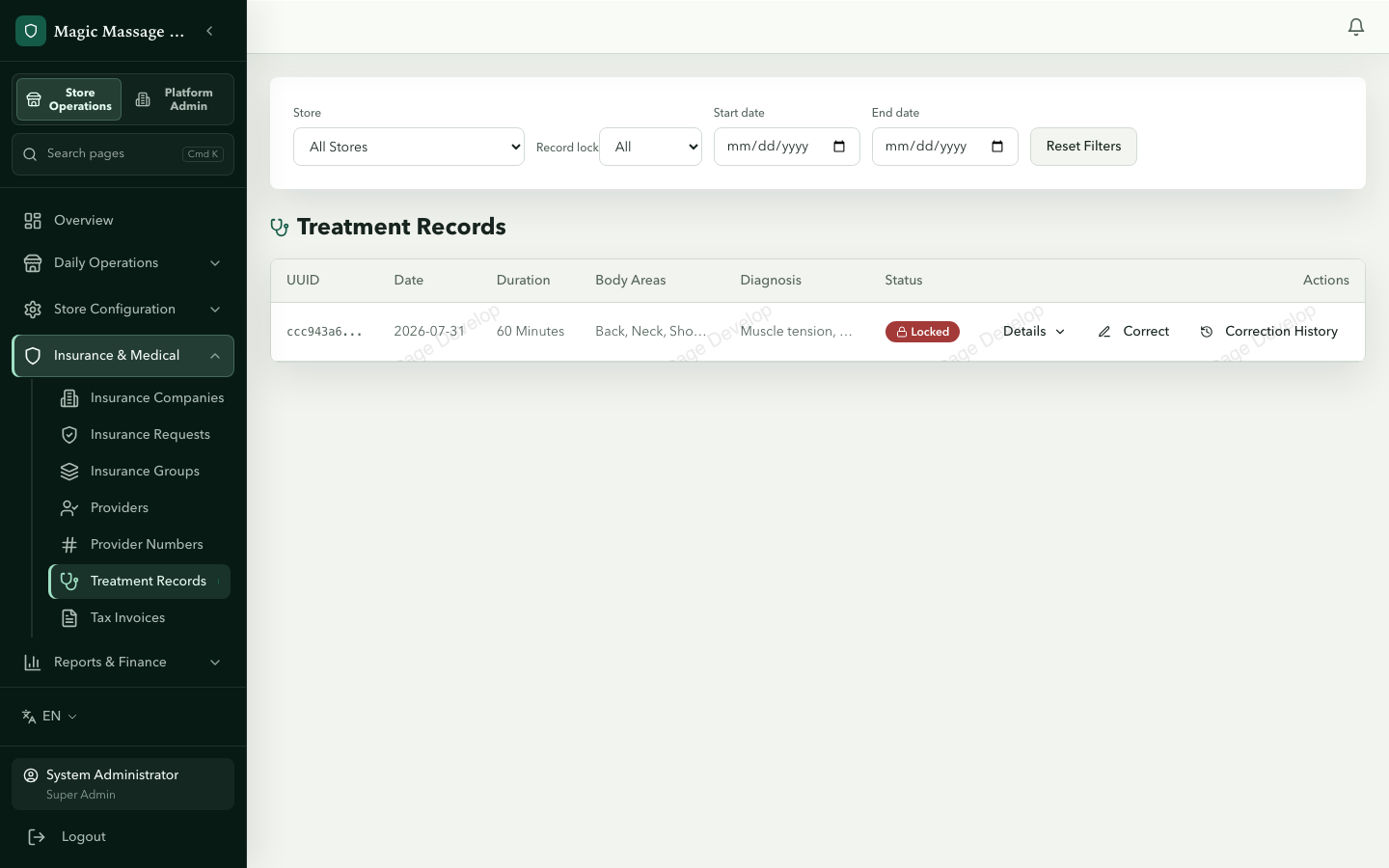
Treatment records are the clinical documentation that insurers audit. The system enforces an immutable trail.
Lifecycle
HICAPS payment or tax invoice issued → Draft auto-created → Therapist fills → Manager locks → (Corrections only)
- Auto-creation: a treatment record draft is created when a HICAPS payment is taken or a tax invoice is issued for the visit — not when the service itself is marked complete.
- Filling: the therapist (or front desk) completes the clinical fields:
- Body areas treated
- Treatment description
- Diagnosis (if applicable)
- Duration and date
- Locking: a store manager reviews and locks the record. After locking:
- No direct edits are possible.
- The record is insurer-audit-ready.
- Corrections (post-lock): if an error is found after locking, a correction is submitted:
- A correction snapshots the locked record and writes a new, already-locked record with the corrected values. Drafts can't be corrected — edit them, or lock first.
- A reason must be provided.
- The original and all corrections are preserved as a full before/after chain.
Why this matters for compliance
- Insurers can request records months later. The lock + correction chain proves the record wasn't silently altered.
- Every correction has a timestamp, author and reason — this is your audit defence.
- Records that are never locked remain as drafts and may not satisfy insurer requirements.
Tax invoice list (Admin view)
Admin → Tax Invoices
A paginated list of all tax invoices across your stores. From here you can:
- Filter by store, date, void status.
- View any invoice's detail.
- Download PDF or Email PDF for any invoice.
- Void an invoice (with reason) — adds a VOID watermark to the PDF.
- Batch void all invoices for a given visit — driven by pasting the Visit UUID.
This complements the POS-side receipt creation covered in Receipts.
Tips
- Lock promptly — unlocked drafts sitting for weeks are a compliance gap. Aim to lock within 24 hours of service completion.
- Provider numbers before go-live — register all provider numbers before the store starts taking HICAPS payments, or the tax invoice flow will error.
- Corrections are okay — the system is designed for corrections. A locked record with a correction is better than an unlocked record that was silently fixed. The correction trail is your proof of diligence, not evidence of error.
- Insurance group tidiness — keep groups meaningful (2–5 companies per group). A single group with 30 companies defeats the purpose of grouping.