Customers & visits
A Visit is one customer party's physical stay — the people present and services delivered, from arrival to close. Its linked Sale is the transaction workspace for services, products, vouchers, packages, payments and Invoices. See Sales cart & checkout.
Find or create a customer
On the New Visit page, search by name or phone:
- Existing customer → pick them from the results.
- New customer → type name/phone and create on the spot. Details can be completed later.
- Walk-in without details? Use the anonymous option — the visit proceeds normally, marked as walk-in. Personal fields stay empty.
Customer phones, emails and birthdays are encrypted at rest and visible only to roles that need them. Names are stored in plaintext for search. Phone numbers are masked on POS: Show phone reveals one on request, and every reveal is recorded in the audit log. Collect what serves the service, nothing more.
Create a visit
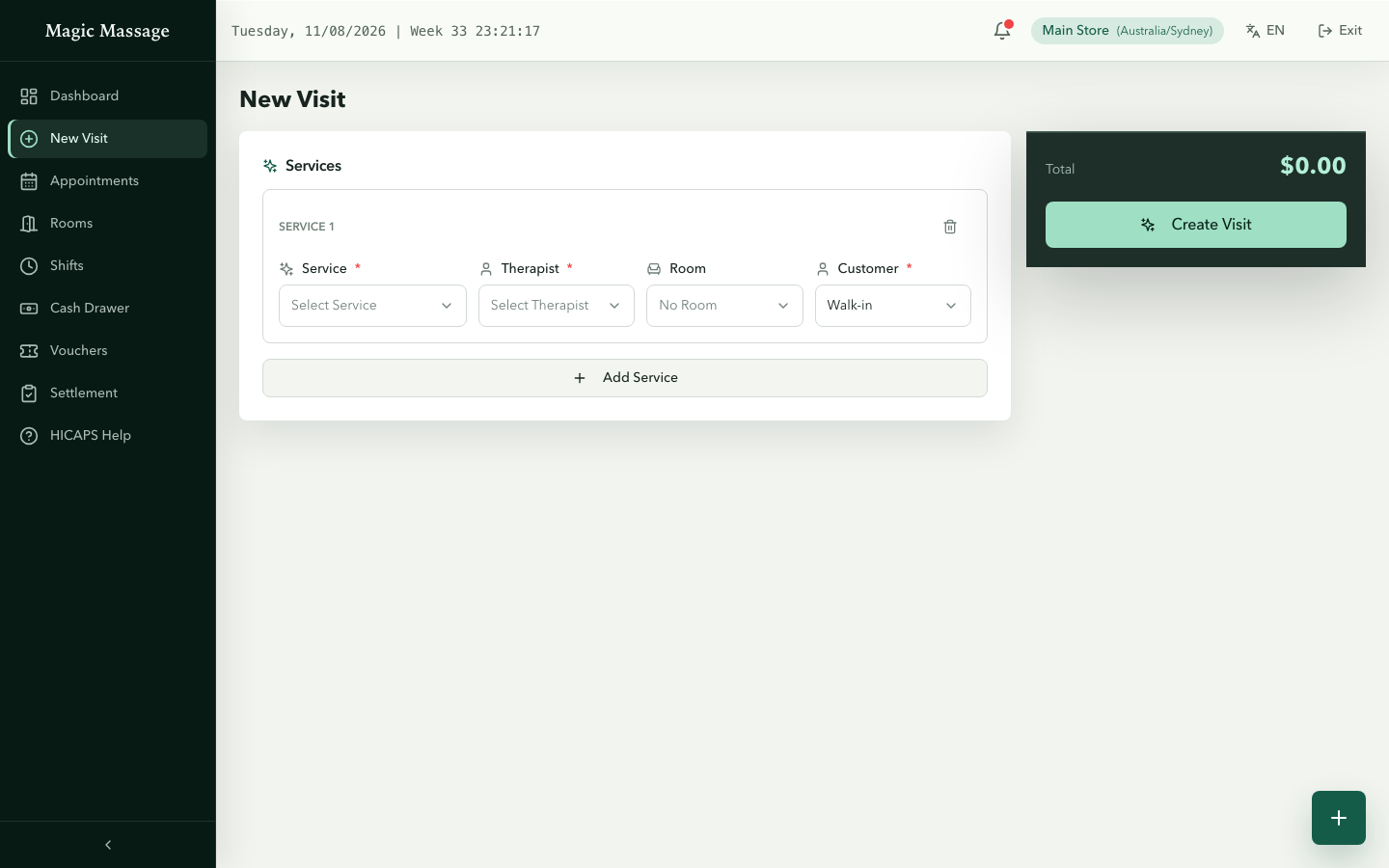
New Visit is a single page, not a wizard:
- Add Service adds a service line. Each line has its own Service, Therapist, Room, Station and Customer.
- Repeat for every guest and service in the party; the running total updates as you go.
- Press Create Visit once and enter your PIN when prompted.
A multi-guest visit (for example, a family) is one Appointment, one Visit and one Sale. Each service line keeps its own guest and therapist/resource. There is no time input on New Visit lines: per-line planned times come from the Appointment, and a walk-in Visit's lines start when you press Start on each line.
The Sale is created with the Visit. Adding another service later adds its commercial line to that same Sale; it does not open a second cart or create a payment.
The visit detail page
| Section | Content |
|---|---|
| Summary cards | Status, guests, created time, totals |
| Services | Each service line with status and actions (start / complete / adjust / transfer) |
| Sale cart | Shown above the tabs: the shared cart for service, retail, voucher and package lines, with the checkout panel |
| Treatment Records | HICAPS/receipt-linked treatment drafts to complete |
| Receipts | Tax invoices issued for this visit |
Customer service preferences
If the customer recorded service preferences (online or on the Kiosk), they appear on the appointment card and the Visit detail as Focus areas, Sensitive — use care and Do not touch. The customer's original wording is shown untranslated; Translate for me in the translation panel requests a machine translation, which may be imperfect — the original wording stays authoritative.
Service lifecycle on a visit
pending ─► in progress ─► completed
              │
              ├─ adjust   (extend time / change price — PIN)
              ├─ transfer (hand to another therapist — PIN)
              └─ void     (created in error — PIN + reason)
Every change creates a new record superseding the old one — nothing is edited in place, so the history always shows who changed what, when. See Services, rooms & therapists for the details.
Closing a visit
When services are done and the linked Sale is settled, close the Visit. Two rules apply:
- Normal close is refused while money is outstanding. Finish the Sale checkout first.
- Customer left without paying? Use Force close: PIN + a written reason. The shortfall is recorded honestly instead of vanishing.
Closing is final for money: once a Visit is closed you cannot take another payment on it or refund one of its payments.
Details in Payments.