Feature availability
Not every store sees every menu — and that's by design, not malfunction.
How availability works
- Plan tier — your subscription (basic / growth / enterprise) sets the default feature set; your account may be on a custom tier with different limits.
- Store switches — individual features can be switched on/off per store on top of the plan.
- Role — what's enabled still shows only to roles that may use it.
- AI credits — AI features need both the
ai.insights.readpermission and AI credits (a monthly allowance plus any top-ups).
If a chapter here is marked "(if enabled for your store)" — inventory, insurance, payroll, marketing assets, credit — its menus simply don't exist for stores without it.
Feature-by-plan matrix
| Feature | Basic | Growth | Enterprise | Notes |
|---|---|---|---|---|
| Core POS (visits, payments, drawer, settlement) | ✓ | ✓ | ✓ | Always included |
| Appointments | ✓ | ✓ | ✓ | Board, calendar, conflict checks |
| Roster (weekly scheduling) | ✓ | ✓ | ✓ | — |
| Marketing assets (vouchers, coupons, packages) | ✓ | ✓ | ✓ | — |
| Inventory & stocktake | ✓ | ✓ | ✓ | Consumable + retail tracking |
| Credit accounts | — | ✓ | ✓ | Customer credit / debt tracking |
| Approval centre | — | ✓ | ✓ | Settlement correction, variance, stocktake approvals |
| Feedback (in-app bug/feature reports) | — | ✓ | ✓ | — |
| Document management | — | ✓ | ✓ | Automatic cloud archive |
| Multi-store (groups, sharing policies) | — | ✓ | ✓ | — |
| Lifecycle marketing automation | — | ✓ | ✓ | Rule-based email campaigns with approval |
| POS QR badges | — | — | — | No tier default; switched on per store by the platform |
| Insurance & compliance | — | — | ✓ | HICAPS, providers, treatment records |
| Treatment records | — | — | ✓ | Lock + correction audit trail |
| Tax invoices (formal receipts) | — | — | ✓ | Provider-based invoicing |
| Payroll (commission tracking) | — | — | ✓ | Periods, guarantee, projection |
| Cross-store settlement | — | — | ✓ | Inter-store financial reconciliation |
| Automation tasks (custom scheduling) | — | — | ✓ | Admin task panel |
| Advanced reports | — | — | ✓ | Extended analytics |
Plan capacity limits
Each plan also sets hard caps on account resources:
| Resource | Basic | Growth | Enterprise |
|---|---|---|---|
| Stores | 1 | 5 | 15 |
| Employees (total across all stores) | 10 | 50 | 150 |
| Admin seats | 2 | 10 | 25 |
| Tenant admins | 1 | 3 | 5 |
| Regional managers | 1 | 7 | 20 |
| Store groups | 1 | 3 | 10 |
| Stores per regional manager | 1 | 5 | 15 |
| Cloud storage | 100 MB | 500 MB | 5 GB |
| Report history | 90 days | 1 year | 2 years |
| Monthly AI credits | 5 | 15 | 50 |
Need more capacity within your current plan? Ask your implementation contact about add-on packs.
Checking your store's features
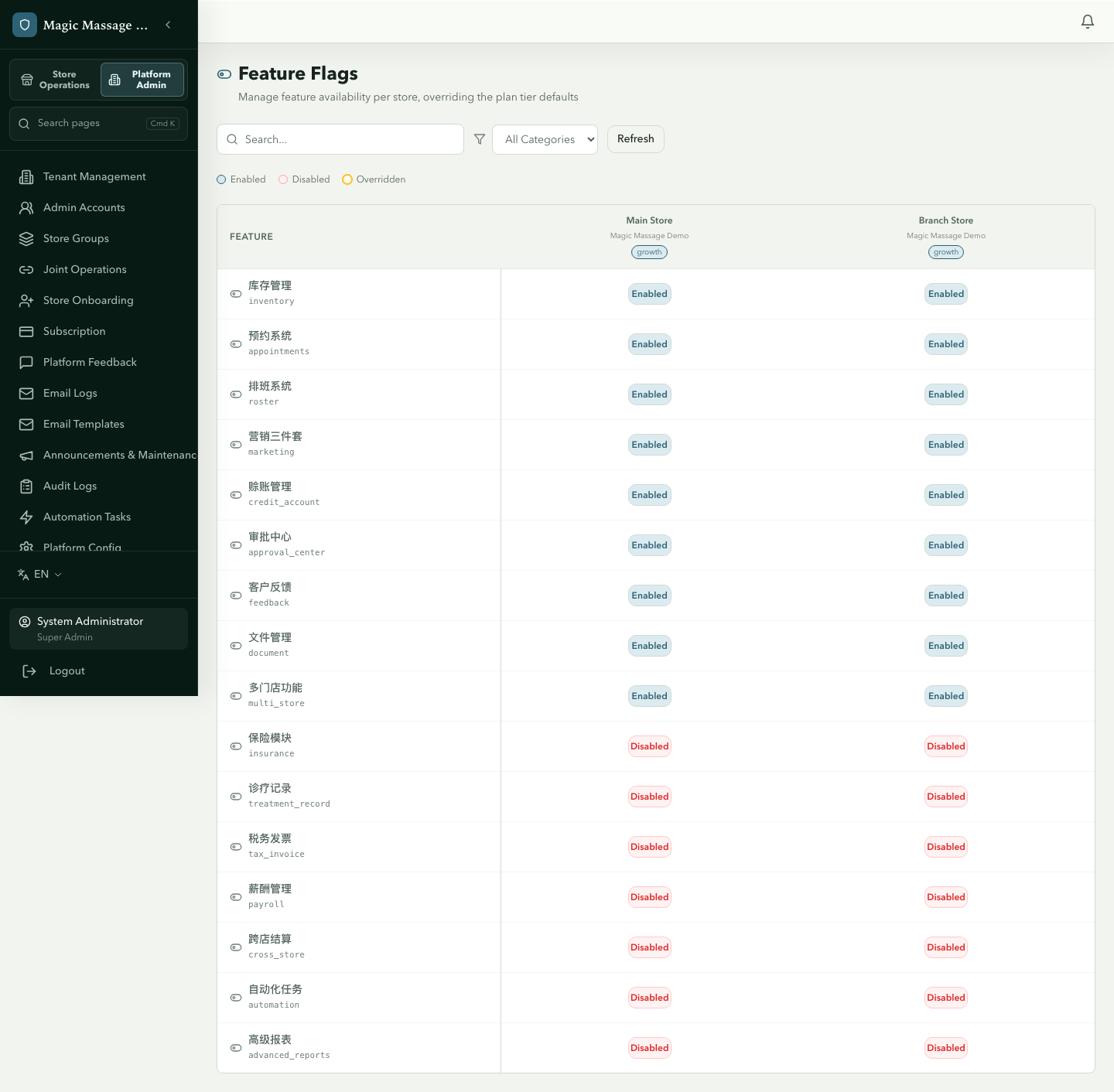
There is no self-service feature page for managers or tenant admins. Admin → Feature Flags is a platform-admin-only cross-store matrix. To see what your store has, look at which menus appear, or ask your implementation contact.
In that matrix each cell reads:
- Enabled (teal) or Disabled (red)
- Overridden (amber ring) = a per-store override differs from the plan default — an override can also grant a feature above the tier
- Not toggleable only when the platform has switched the feature off globally
Requesting a feature
If you need a feature that your plan doesn't include:
- Contact your implementation contact about plan options.
- On Growth and Enterprise you can also use Admin → Platform Feedback to request it — the product team tracks demand.
Per-store overrides
Platform admins (super_admin) can enable or disable individual features per store regardless of plan tier — except a feature the platform has globally deactivated, which no store override can turn back on. This is used for:
- Beta-testing a feature at one store before rolling out.
- Disabling a feature that a store doesn't need (simplifying their interface).
- Granting a feature as part of a custom arrangement.
Managers and tenant admins cannot change these overrides themselves — only platform admins can.